SIM Totals
3 min
SIM Totals illustrates how your SIM population changes from month to month.
Rather than focusing on usage, this chart shows how SIM counts evolve across different group types and statuses.
Group type breakdown
A separate chart is provided for each group type:
- Live groups
- Pending groups
- Suspended groups
This allows you to understand how SIMs move through lifecycle states over time.
Status split
Within each chart, totals are split by SIM status:
- Active
- Deactivated
This makes it easier to distinguish between growth driven by new activations and changes caused by deactivations or group movements.
Filtering options
Charts can be filtered to focus on:
- A specific group
- A specific SIM type
This allows you to isolate particular estates or product types and review how their populations are evolving.
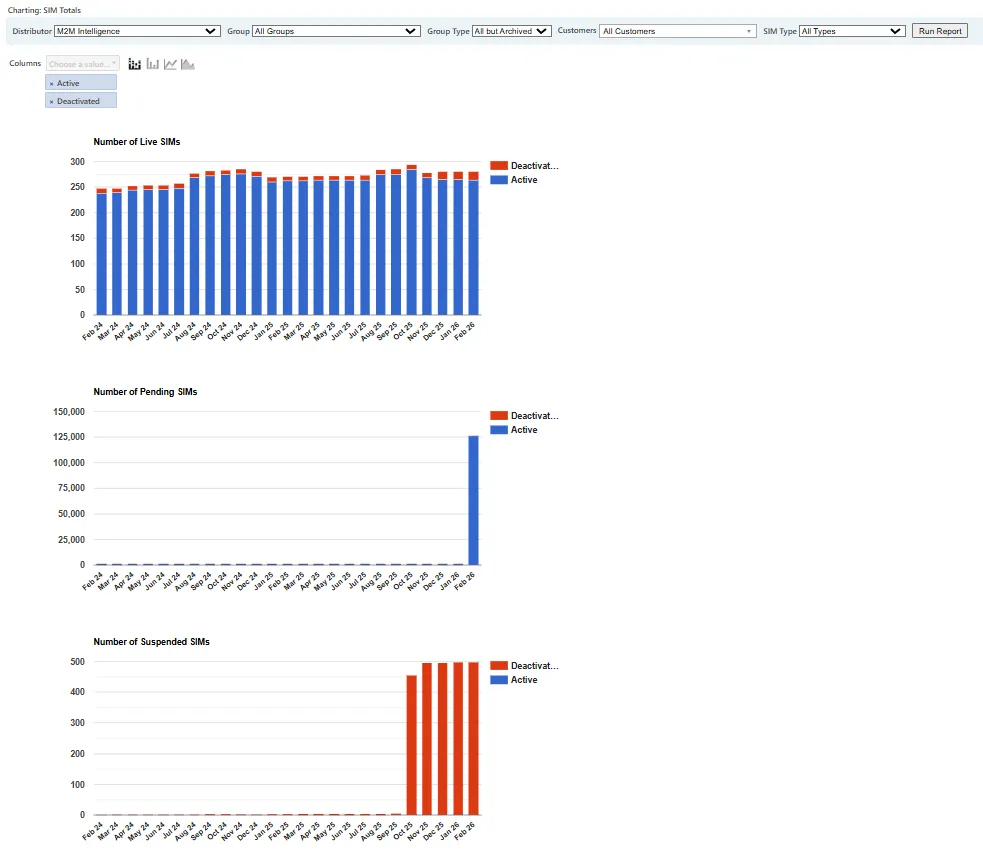
Monthly SIM population totals split by group type and status.
When to use SIM Totals
SIM Totals is useful when:
- Reviewing estate growth over time
- Monitoring activation and deactivation trends
- Tracking lifecycle movement between groups
- Validating billing changes linked to SIM population shifts