Customers
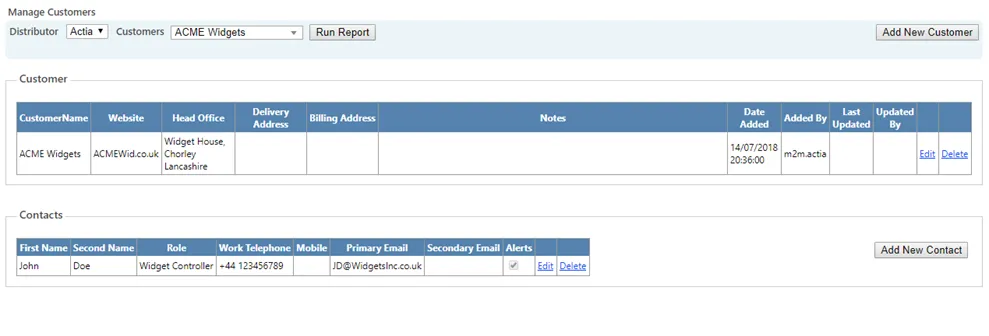
The Customers page allows you to create and manage customer records within the Portal.

Customer names can be assigned to individual SIMs or Groups of SIMs. You may also store full customer details, including address and contact information, alongside SIM data.
Viewing existing customers
To view an existing customer:
- Select the customer name from the dropdown list
- Click Run Report
This displays the stored customer details and associated contacts.
Adding a new customer
To create a new customer:
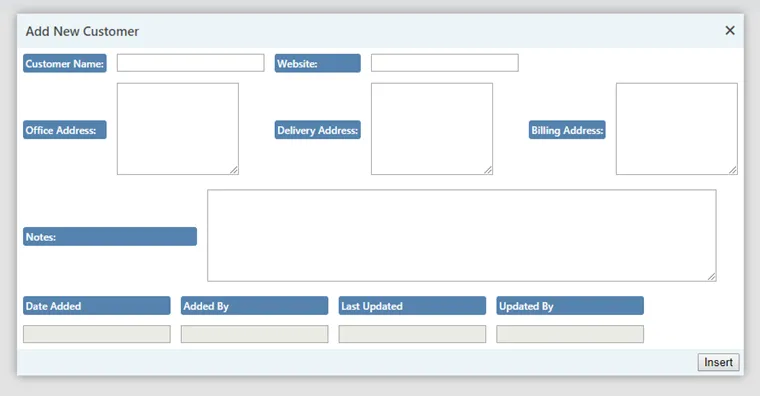
- Click Add New Customer
- Complete the required fields (customer name is mandatory)
- Select Insert
Additional details such as address and contact information can be added if required.
To assign a customer to SIMs, refer to the SIM Action page.
Editing and deleting customers
Customer records can be edited or deleted using the available controls.
If you delete a customer:
- Any SIMs currently assigned to that customer will automatically have the customer designation removed
- A confirmation warning will appear before deletion is finalised
Managing customer contacts
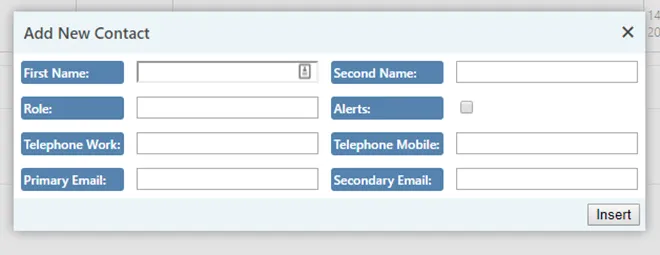
You can add contact records to each customer.
To add a contact:
- Click Add New Contact
- Enter the required details
- Select Insert
Usage alert notifications
To send warning and cut-off usage alerts to a customer contact:
- Enter a valid Primary Email address
- Tick the Alerts box
Only alerts relating to SIMs assigned to that customer will be sent to the contact.
Ensure the email address is entered correctly and inform the contact that automated alerts will be sent from:
You may add multiple contacts and configure alert preferences for each individually.
When to use Customers
The Customers page is typically used when:
- Structuring your SIM estate by end customer
- Managing contact details for operational communication
- Configuring usage alert recipients
- Maintaining administrative records linked to SIM assignments