SIM Action
SIM Action allows you to apply configuration changes to up to 5,000 SIMs at a time.
Changes made on this page take effect immediately and may impact connectivity, tariff assignment, and billing. All actions are logged against your user account.
Available actions
SIM Action provides access to the following functions:
- Activate SIMs by moving them into a Live group
- Move SIMs between tariff groups (where permitted)
- Temporarily deactivate SIMs by changing their status
- Close SIMs (this ends monthly charges and cannot be reversed)
- Assign custom field values
- Assign or clear a Customer designation
- Modify warning and cut-off levels
- Add nominal credit (Manx Telecom SIMs only)
- Assign Auto-Activation groups
Only one action type can be performed at a time.
Step-by-step process
The page guides you through selecting SIMs and applying the chosen action.
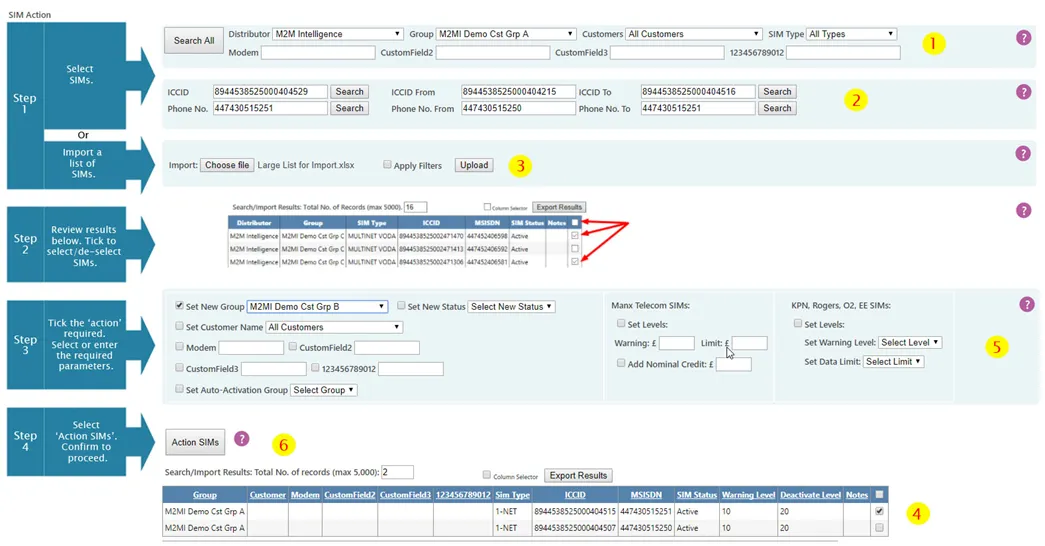
1. Find the SIMs
Use the filters at the top of the page to narrow your search.
For example:
- When activating new SIMs, filter by the Pending group
- Use group, SIM type, or status filters to refine results
Select Search All to list matching SIMs.
You can also:
- Enter a full or partial ICCID
- Enter a full or partial telephone number
- Enter number ranges
Partial entries return all matching SIMs.
Alternatively, you can import an Excel file containing ICCIDs or phone numbers. The help icon provides guidance on the required format.
2. Select the SIMs
Results appear at the bottom of the page.
Tick the box at the end of each row to select the SIMs you want to action.
3. Choose the action
Select the required action from the available options.
In most cases, this will be:
- Set New Group, or
- Set Auto-Activation Group
4. Confirm and process
Select Action SIMs.
A confirmation message will appear (or an error message if the selection is invalid). Once confirmed, processing begins.
A progress indicator shows how many SIMs have been processed.
Important considerations
- Only one action type can be applied at a time.
- You may perform additional actions on the same selected SIMs without reselecting them.
- Actions are limited to one group and one SIM type at a time.
- Up to 5,000 SIMs can be actioned at once. If more than 5,000 match your search, only the first 5,000 are available for action.
Group and status behaviour
- Set New Group automatically activates or deactivates SIMs as appropriate. There is no need to use Set Status afterwards.
- If a SIM has reached its cut-off limit and needs to be reactivated, you must increase its cut-off level. This can be done by:
- Using Set Levels, or
- Moving the SIM to a group with a higher default cut-off level
Exporting and managing results
- The Export SIM List button exports your search results to Excel.
- This can be useful for reviewing large result sets before re-importing a refined list.
- The Column Picker allows you to select which columns are displayed. Your selection is applied on the next search and remembered for future use.
- Results can be sorted by clicking column headings. Sorting toggles between ascending and descending order.
When to use SIM Action
SIM Action is used when you need to:
- Activate new SIMs
- Move SIMs between tariff configurations
- Suspend or close services
- Apply configuration updates in bulk
For analysis and investigation, refer to the Reporting section.