Distributor Transfer
4 min
Distributor Transfer allows SIMs to be moved between distributors where sub-distributors are configured on your account.
This function is typically used to transfer SIMs between top-level Pending groups and sub-distributor Pending groups.
Transfers take effect immediately and are limited to 5,000 SIMs per operation.
When Distributor Transfer is available
This page is only available if sub-distributors are configured on your account.
If no sub-distributors are set up, selecting Distributor Transfer will redirect you to the home page.
Transferring SIMs
You can transfer SIMs by:
- Searching for SIMs using filters
- Entering specific SIM identifiers
- Uploading a list of SIMs
Once the SIMs are listed:
- Select the SIMs to transfer
- Choose the target Distributor
- Select the target Pending group
- Confirm the transfer
The SIM types of the source and target groups must match.
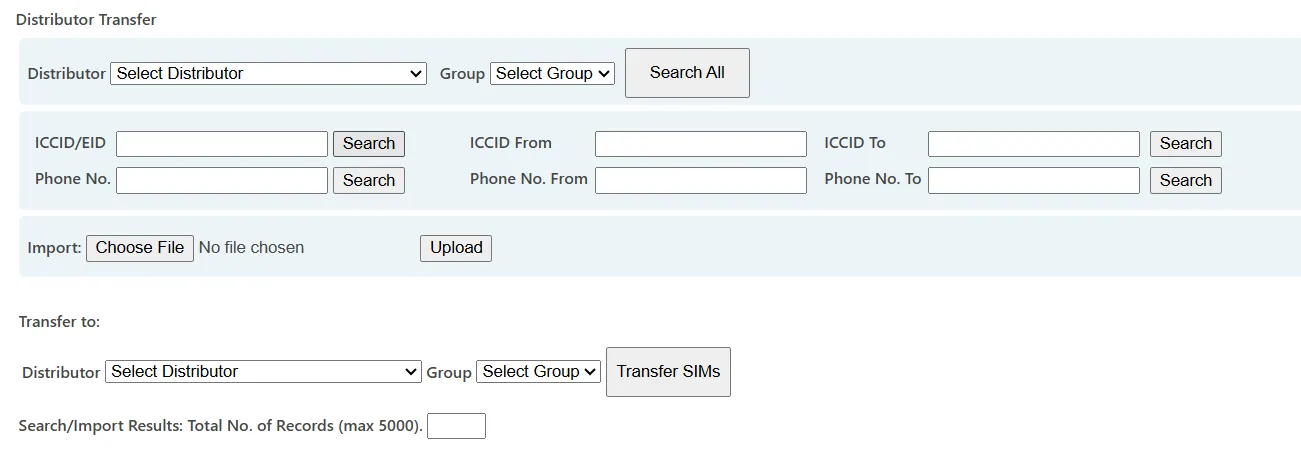
Distributor Transfer interface showing SIM selection and target distributor assignment.
Key points
- Transfers are limited to 5,000 SIMs per operation
- Only compatible SIM types can be transferred
- Transfers apply immediately
- All actions are logged
When to use Distributor Transfer
Distributor Transfer is typically used when:
- Allocating new SIM stock to sub-distributors
- Reassigning SIM ownership within a distributor hierarchy
- Correcting allocation errors between Pending groups