Custom Field Headings
3 min
The Portal provides four custom fields that can be used to store your own data against individual SIMs or groups of SIMs.
Custom Field Headings allows you to define the labels for these fields so they reflect your internal terminology and processes.
Defining custom field labels
Each of the four available fields can be assigned a custom heading.
For example, you may choose to use these fields for:
- Asset ID
- Device Serial Number
- Site Name
- Internal Reference
- Project Code
Once a heading is defined, it will appear throughout the Portal wherever custom fields are displayed or editable.
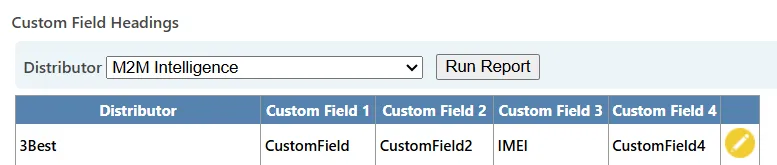
Custom Field Headings configuration for defining SIM metadata labels.
How custom fields are used
Custom fields can be:
- Assigned manually using SIM Action
- Imported in bulk using Import Custom Data
- Used as filters in Reporting
They provide flexibility to align SIM records with your own systems and identifiers.
Important considerations
- Changing a field heading does not remove existing data
- The heading update applies globally
- Custom fields are optional and may be left unused