Daily Traffic Summary
Daily Traffic Summary provides a day-by-day breakdown of potentially chargeable usage for each SIM within a selected billing month.
Each reporting day is defined as Midnight UTC to Midnight UTC.
You must select a specific month before running the report.
Data is available for:
- The current month
- The three previous months
Selecting a billing month
The report runs against a single billing month at a time. All usage is grouped into daily totals within that month.
Because traffic records are not always received in real time, values for the most recent days may continue to update. Depending on SIM type, location, and network, there may be a delay before all traffic is processed.
To ensure accuracy, allow at least three days before considering the data final.

Report structure
Results are presented in two sections:
- Group summary
- SIM detail
Group summary
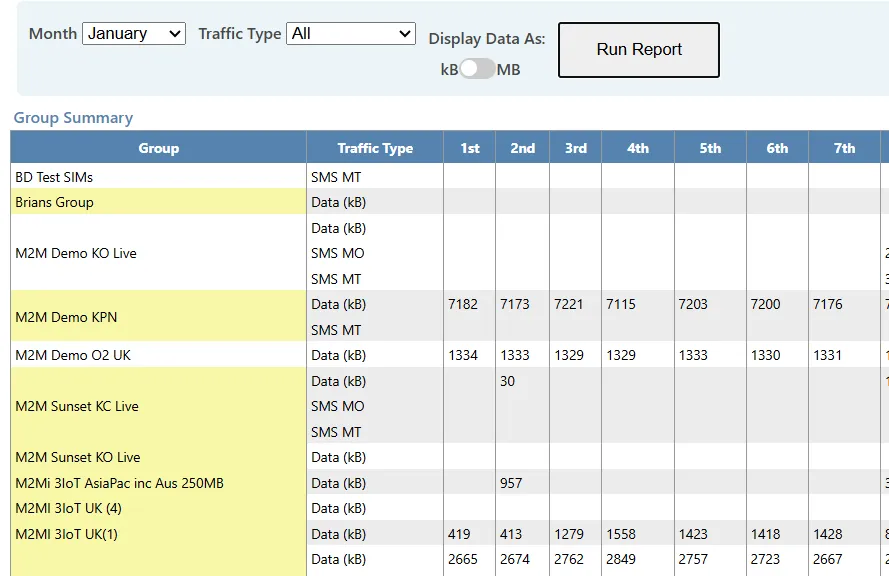
The group summary provides daily totals for each group in the selected month.
Live groups are highlighted in yellow to distinguish chargeable groups.
This section provides a high-level view of how usage accumulates across the month at group level.
SIM detail
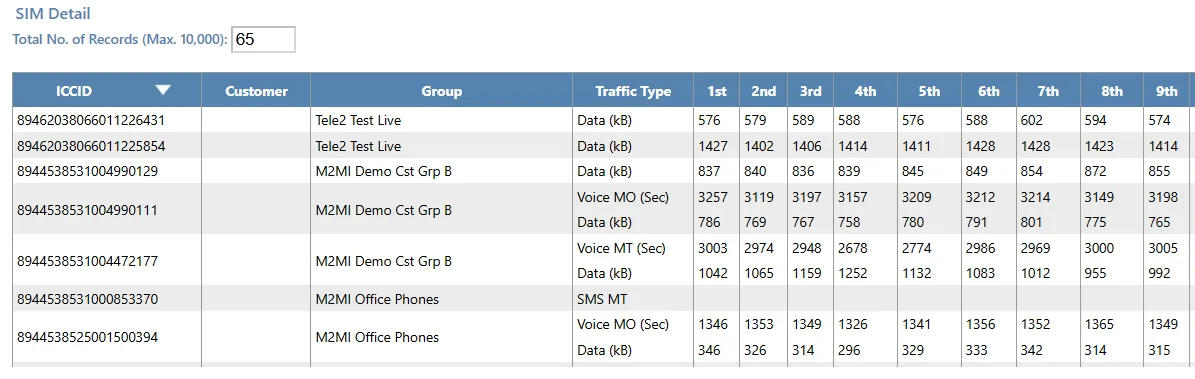
The SIM detail section provides a daily usage breakdown for each SIM.
This report:
- Shows daily totals within the selected month
- Includes all traffic types by default
- Does not provide a tariff zone breakdown
For zone-based analysis, refer to the Monthly Traffic Summary report.
By default, results are restricted to SIMs with recorded traffic in the selected month.
On-screen results are limited to 10,000 rows. Excel exports include the full result set, including SIMs with zero traffic.
Filtering and interpretation
Several filters are available to refine results. Filtered results can be exported to Excel for further analysis.
When filtering:
- Group and Customer values are based on the assignment recorded on the day the traffic record was received.
- If filtering by customer, only traffic recorded while the SIM was assigned to that customer will be shown.
- Custom field filters match SIMs based on their current live values.
Results can be sorted ascending or descending by selecting any column heading.
Because all traffic types are included by default, it may be helpful to filter by a specific traffic type when sorting large result sets.