Monthly Traffic Summary
Monthly Traffic Summary provides a definitive breakdown of potentially chargeable usage for each SIM within a selected billing month.
You must select a specific month before running the report.
This report is used in conjunction with group tariffs to calculate your monthly bill.
Selecting a billing month
The report runs against a single billing month at a time. Once selected, all results reflect usage assigned to that period.
Some traffic records received in the first few days of a new month may relate to usage from the previous month. These records are allocated to the correct billing period. For this reason, complete monthly data is typically finalised a few days into the new month.

Report structure
Results are presented in two sections:
- Group summary
- SIM detail
Together, these provide a complete view of how usage contributes to your monthly billing position.
Group summary
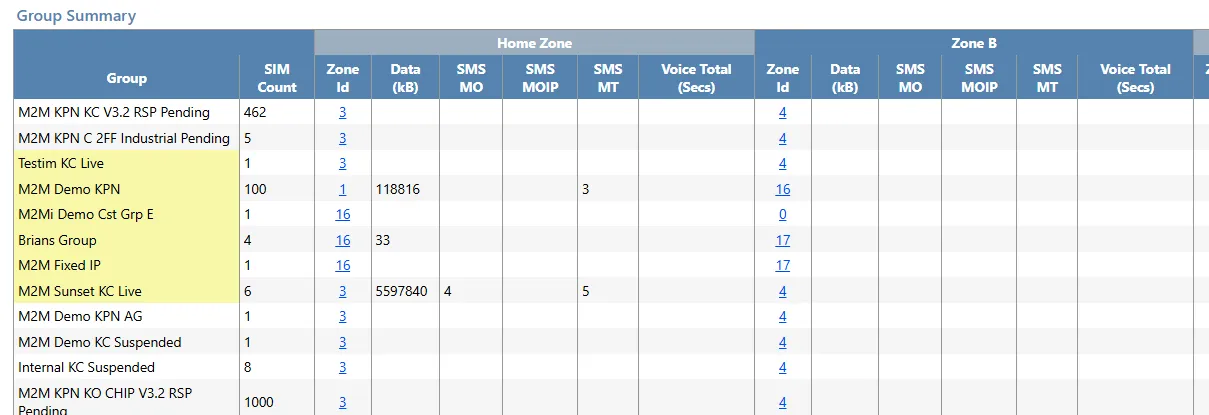
The group summary totals all potentially chargeable traffic for each group in the selected month.
Usage is split across geographical zones. The Base Zone represents the zone included in the tariff for that group.
Usage outside the Base Zone is treated as out-of-zone usage and is chargeable according to the tariff defined for that group.
This summary provides a consolidated view of group-level traffic before reviewing individual SIM contributions.
SIM detail
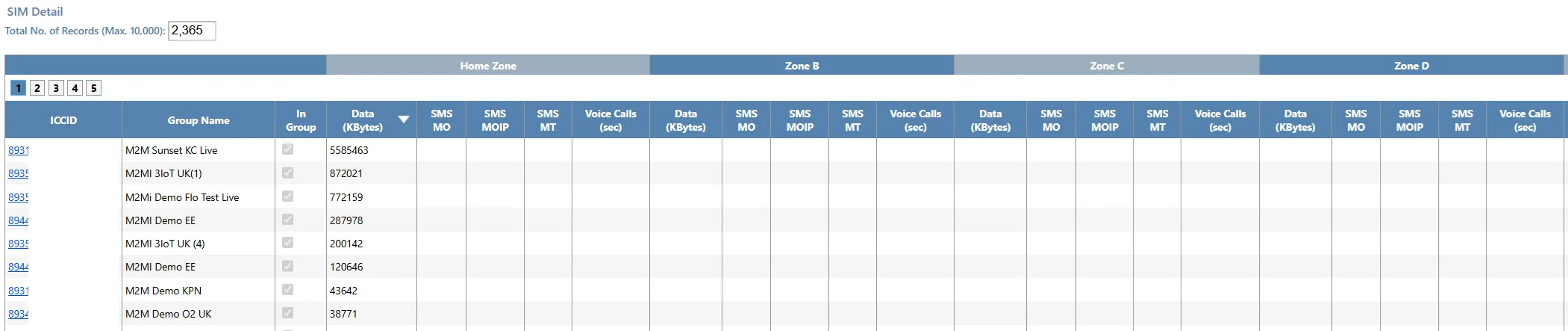
The SIM detail section provides a per-SIM breakdown of usage across all zones for the selected month.
This is the definitive usage record used to calculate billing, alongside group tariff information.
Results are:
- Ordered by highest home zone data usage by default
- Sortable by any column by selecting the column header
- Limited to 10,000 records on screen
Exports to Excel include the full result set without record limits.
In Group indicator
For months from January 2019 onwards, the report includes an In Group column.
Monthly bundle charges are based on the number of SIMs in each group at month end, regardless of whether those SIMs are active or deactivated.
To understand whether a SIM contributes to charges, you must consider:
- Its usage during the month
- The group it was assigned to at month end
If the In Group field is not ticked, this indicates the SIM had usage in the group during the month but was subsequently moved to a different group before month end.
Additional filtering
Additional filters allow you to analyse results:
- By customer – Results reflect the customer assigned during the selected month.
- By custom fields – Filters use the current live value of those fields.
This enables targeted analysis across subsets of your SIM estate.
Exporting data
On-screen results are limited to 10,000 records to maintain performance.
Exports to Excel include the full result set with no limit on the number of records, supporting large-scale offline analysis.