Insight Live
Insight Live provides a real-time snapshot of your SIM Estate. It brings together SIM Status, usage, and forecast charges to help you understand current activity and identify where attention may be required.
Access to insight Live depends on your user role. Users with customer-based roles see a usage-focused view without financial or tariff information and do not have access to group alert configuration.
Forecast summary
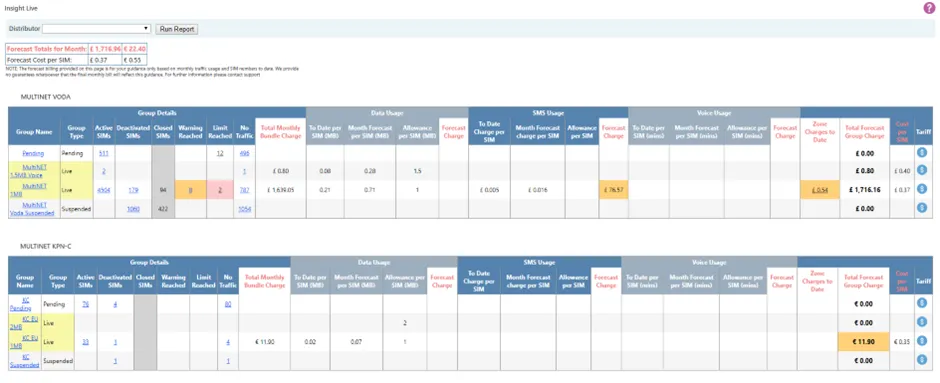
At the top of the page, Insight Live displays a summary of the total forecast charge for the current billing month and the average forecast cost per SIM. As the month progresses, this forecast naturally moves closer to the final billed value.
Changes such as large numbers of activations or SIMs moving between groups can significantly affect the forecast at any point during the month. Where billing is split across multiple currencies, a separate forecast total is shown for each currency.
Groups overview
Below the forecast summary, SIMs are shown in a series of grouped blocks. Each block represents a SIM type, and each row within the block represents a group.
Live, chargeable groups are clearly highlighted. Colour indicators are used to draw attention to areas that may require action:
- Amber indicates SIMs that have reached a warning threshold.
- Red indicates SIMs that have reached a usage limit and have been restricted.
Insight Live presents information across five column areas, from left to right:
- Group details
- Data usage
- SMS usage
- Voice usage
- Charge totals
Each area is described in more detail below.
Group details and alert configuration
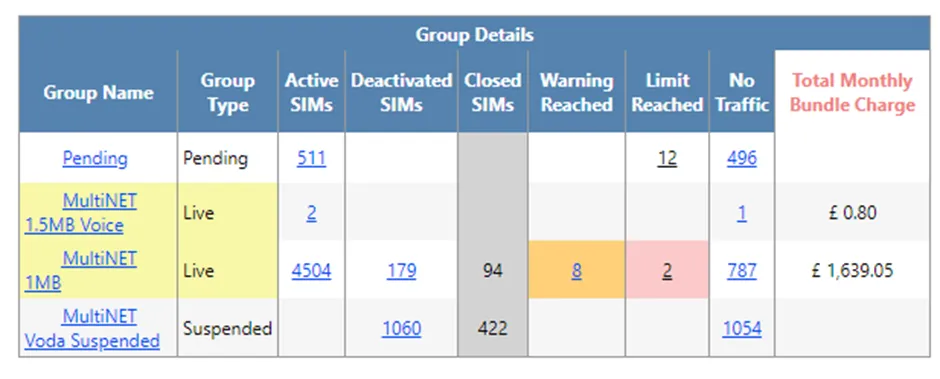
The Group details area shows the number of SIMs in each group and highlights:
- Deactivated SIMs
- SIMs with no usage in the current month
- SIMs that have reached warning or cut-off levels
Selecting any of these values opens a filtered SIM Finder view showing the relevant SIMs.
This section also shows the base group charge. For most tariffs, this is calculated as the monthly bundle fee multiplied by the number of SIMs in the group, including both active and deactivated SIMs. For tariffs based on an upfront activation charge, the charge reflects the number of SIMs activated during the current month.
Selecting the group name opens the Group Alert Configuration panel.
SIM default alert levels
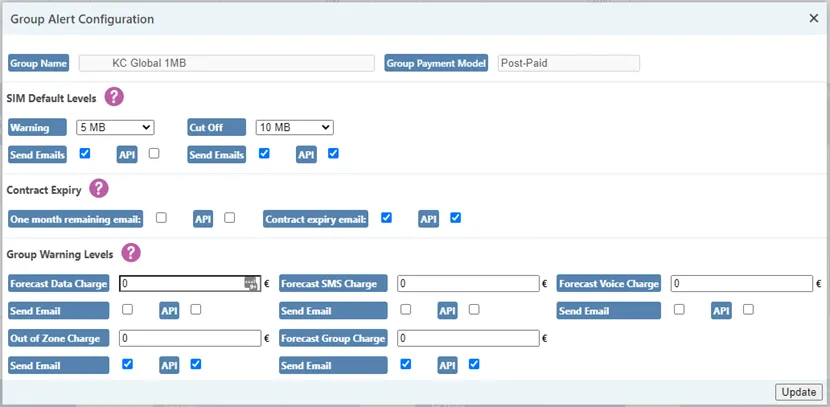
Administrators can define default warning and cut-off levels for SIMs within a group. These levels are automatically applied when SIMs are moved into the group using SIM Actions.
When a SIM reaches the warning level, it is highlighted in amber. When it reaches the cut-off level, chargeable traffic is restricted and the SIM is highlighted in red. Email and API notifications can be enabled for both warning and cut-off events.
If individual SIM alert levels are later customised, they will be reset to the group defaults if a Set Group action is performed. Alert levels for Pending and Suspended groups are fixed and cannot be changed.
Contract expiry alerts
Some groups may have contractual commitments measured in months. These are evaluated at the start of each calendar month.
The contract expiry settings allow notifications to be triggered when a SIM has one month remaining contractually, and again when the contract has expired. Notifications can be sent by email and/or API.
Group-level warning thresholds
Group-level warning thresholds can be defined for:
- Forecast data charges
- Forecast SMS charges
- Forecast voice charges
- Forecast total group charge
Data, SMS, and voice warning levels are typically zero by default, as charges are only expected when usage exceeds the bundle allowance.
The default forecast total group charge warning is set to twice the monthly bundle charge multiplied by the number of SIMs in the group. When a threshold is exceeded, the value is highlighted in amber and optional email or API notifications are triggered.
If a threshold is increased after being exceeded, a new alert will trigger again if the updated level is reached.
Data, SMS, and voice usage
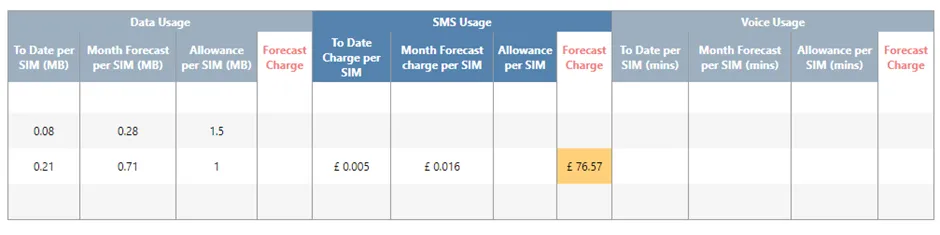
Insight Live shows usage for data, SMS, and voice services on a per-SIM basis. Usage is aggregated across all SIMs in each group and compared against the monthly allowance defined by the tariff.
For each service, the page shows:
- Usage per SIM to date
- Forecast usage per SIM at month end
- Allowance per SIM per month
- Any forecast charges
If forecast charges exceed configured alert thresholds, they are highlighted in amber.
SMS usage model
SMS usage is presented differently to data and voice because SMS charges may apply across multiple message types. SMS allowances are therefore defined as a monetary credit per SIM rather than a message count.
This credit is applied against all SMS usage regardless of message type. Insight Live shows SMS usage as an aggregated charge per SIM, forecast forward for the month, with the allowance deducted to produce a net forecast SMS charge.
Charge totals
The charge totals area brings together:
- Group bundle charges
- Forecast usage charges
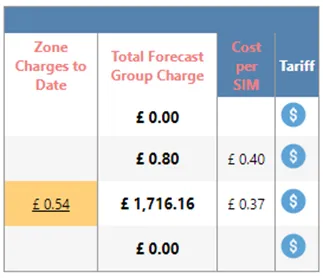
This produces an overall forecast monthly charge for each group. Where configured warning thresholds are exceeded, values are highlighted in amber. An average cost per SIM is also shown to support comparison across groups.
Tariff details
Tarriff details for each group can be viewed using the tariff button at the end of the group row.
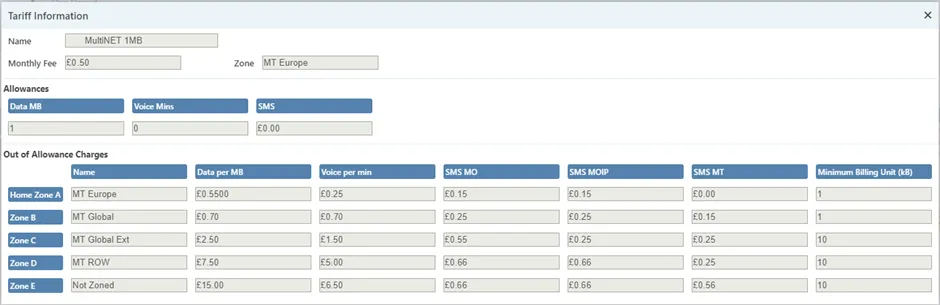
The monthly fee represents the bundle charge applied per SIM at month end, including deactivated SIMs. Bundle allowances are aggregated across the group, meaning total group usage is measured against the combined allowance rather than individual SIM limits.
Out-of-bundle charges apply when usage exceeds the bundle allowance within the home zone. Minimum billing units define how usage is rounded for charging purposes.
Zone charges
If usage occurs outside a group’s Base Zone, charges apply at the rates defined in the tariff. Zone charges to date are shown in the Zone Charges to Date column and can be selected to open the Zone Charges page for further detail.
Zone charges are not forecast forward, as out-of-zone usage is often irregular. Where repeated out-of-zone usage is identified, moving SIMs into a more appropriate group may provide better rates.