Order Form
The Order Form page allows you to submit a new SIM order request.
If you have placed a similar order previously, you can use the Re-order option from the Orders page to open a pre-populated form and amend it as required.
Mandatory fields are marked with an asterisk (*).
Order contact details
Enter the contact details for the person responsible for the order.
This contact will:
- Receive order updates
- Be contacted if clarification is required
Ensure the email address provided is correct.
Order items
To add SIMs to your order:
- Select the Add icon to create a new order line
- Choose the SIM type
- Select the form factor
- Enter the quantity
Help dialogs are available to assist with SIM type and form factor selection.
You may:
- Add multiple order lines
- Amend existing lines
- Delete order lines
If you select a SIM type that has not previously been used on your account, a warning will appear advising you to contact support, as additional setup may be required.
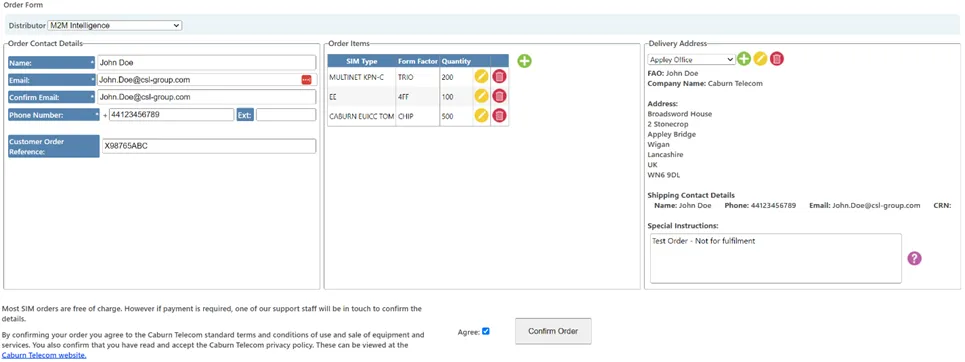
Delivery address
To add delivery details:
- Select the Add icon
- Enter the address information
- Provide a title for the address so it can be reused
You can select from previously saved delivery addresses using the dropdown menu.
The shipping contact should be someone available to respond to courier enquiries regarding the delivery.
Submitting the order
Once all required details have been completed:
- Review the order information
- Submit the form
Order confirmation and status updates will be sent to the Order Contact email address.