Orders
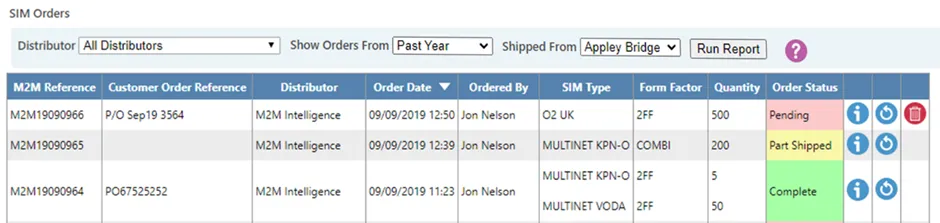
he Orders page is available to Administrator users and provides a list of your current and previous SIM orders.
By default, orders from the last month are displayed. This view can be expanded to show all historical orders.
Orders placed prior to August 2019 display summary information only, including SIM types and quantities. More recent orders provide full order details, including shipment information.
Viewing order details
To view detailed information about an order, select the Info icon.
This displays:
- SIM types ordered
- Quantities
- Delivery details (where available)
- Order status
Re-ordering SIMs
To reorder a previous order, select the Re-order icon.
This opens a pre-populated Order Form based on the selected order. You can then amend quantities or details as required before submitting.
Deleting pending orders
Orders with a status of Pending can be deleted.
Select the Delete icon to remove a pending order. A confirmation message will appear before the deletion is finalised.
Completed or processed orders cannot be deleted.
When to use Orders
The Orders page is typically used when:
- Reviewing previous SIM purchases
- Checking order status
- Reordering SIM stock
- Managing pending order requests