Send SMS
Send SMS allows you to send messages immediately or schedule them for delivery within the next 72 hours.
Messages can be sent to:
- Individual SIMs
- SIM ranges
- Groups
- Custom-selected lists
- Imported Excel lists
You can also save frequently used messages for reuse.
SMS cannot be sent to Open User Group (OUG) SIMs (for example MultiNET KPN-O). Groups containing OUG SIM types are excluded from search options.
Step 1 — Find the SIMs
As with SIM Action, begin by identifying the SIMs you want to message.
Use the filters at the top of the page to refine your search.
- The Status filter defaults to Active, as SMS can only be sent to active SIMs.
- Use group, customer, or SIM type filters to narrow the results.
Select Search All to display matching SIMs.
You can also:
- Enter a full or partial ICCID
- Enter a full or partial telephone number
- Enter number ranges
Alternatively, import an Excel file containing ICCIDs or phone numbers. The Import Help button provides guidance on the required format.

Step 2 — Select SIMs
Search results are displayed at the bottom of the page.
- A maximum of 5,000 SIMs can be selected at one time.
- Tick the box at the end of each row to select SIMs.
- Use the header tick box to select or deselect all results.
Step 3 — Select or compose your message
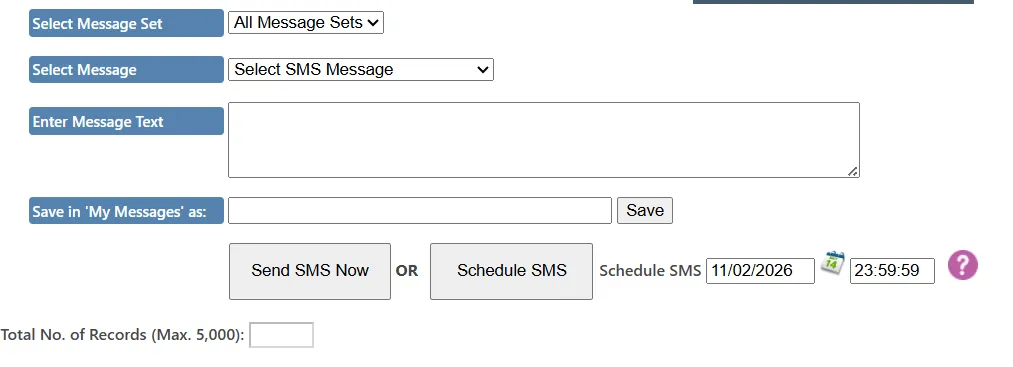
If you have saved messages, they are organised into Message Sets.
- Select the required Message Set.
- Choose the message from the dropdown list.
- The message content will appear in the text box.
You can also:
- Enter a new message directly into the text box
- Edit an existing message before sending
Saving messages
To save a new or edited message:
- Enter a title in the Save in My Messages as field
- Click Save
Saved messages are stored in your My Messages set.
If you want a message to be available to other users, assign it to additional Message Sets using the Manage Saved SMS page.
Step 4 — Send or schedule
Once you are satisfied with the selected SIMs and message content:
- Click Send SMS now to send immediately
- Or select a future date and time (within 72 hours) and click Schedule SMS
A confirmation message displays the number of messages to be sent.
After confirming:
- Messages are sent or scheduled accordingly
- A live counter shows progress
- Select Exit to close the confirmation window
Key considerations
- SMS can only be sent to Active SIMs
- OUG SIM types are excluded
- Maximum 5,000 SIMs per send
- Scheduled messages can be set up to 72 hours in advance
- All SMS activity is logged
When to use Send SMS
Send SMS is typically used for:
- Device configuration commands
- Remote diagnostics
- Operational alerts
- Controlled broadcast messaging
- Scheduled maintenance instructions