Send SMS Bulk Import
Send SMS Bulk Import allows you to upload an Excel spreadsheet containing SIM identifiers and message content.
Unlike the standard Send SMS page, this function allows you to send a different message to each SIM.
This is particularly useful where messages include device-specific information such as unique passcodes or configuration parameters.
When to use Bulk Import
Bulk Import is typically used when:
- Each SIM requires a unique message
- Messages contain device-specific credentials
- Configuration parameters differ between devices
- You are performing staged or controlled deployments
Preparing your spreadsheet
The spreadsheet must contain:
- A valid SIM identifier (ICCID or telephone number)
- The SMS message to be sent
An example file format is available below.
Additional guidance is available via the Help button on the page.
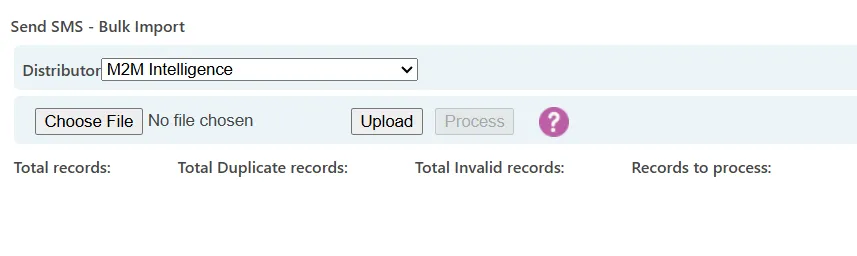
Upload and validation
When you upload a file:
- The system validates SIM identifiers
- Invalid SIMs are flagged
- Duplicate SIM entries are identified
Duplicate SIMs are processed. This allows multiple different messages to be sent to the same SIM if required.
However, there is no guarantee that messages will be delivered in the order they appear in the spreadsheet.
Processing messages
Once the file has been validated:
- Review any validation warnings
- Select Process
All listed messages will then be sent to the corresponding SIMs.
As with standard SMS sending:
- Activity is logged
- Delivery timing depends on network conditions
Key considerations
- Ensure spreadsheet formatting matches the example template
- Validate SIM identifiers before upload
- Duplicate SIM entries are allowed
- Message delivery order is not guaranteed