SIM Finder
SIM Finder allows you to search, filter, and analyse your SIM estate in detail. It is the primary tool for locating individual SIMs, reviewing their status and usage, and taking action at scale.
The page supports both targeted searches for specific SIMs and broad analysis across large populations.
Search and filter controls
At the top of the page, a comprehensive set of filters allows you to refine your search before returning results.
You can filter SIMs by attributes such as:
- Distributor and customer
- Group and group type
- SIM type and form factor
- Country, network, and radio access technology (RAT)
- SIM status, including active, deactivated, and closed
Filters can be combined to narrow results or left broad to review your full SIM estate.

SIM search options
Below the filter panel, SIM Finder provides multiple ways to search for specific SIMs or ranges of SIMs.
You can:
- Search all SIMs
- Search using a partial ICCID or EID
- Search using a partial or full phone number
- Search within defined ICCID or phone number ranges
Entering a partial value returns all SIMs that match the entry, making it easier to locate SIMs when full identifiers are not known.

Importing SIM lists
SIM Finder also supports importing SIM lists from a spreadsheet. This is useful when working with large, predefined sets of SIMs.
To import SIMs:
- Select Choose file and browse to your spreadsheet
- Click Upload to run the search
- Optionally apply the filters defined in the top panel
The help icon next to the upload control provides details of the required file format.

Search results and SIM details
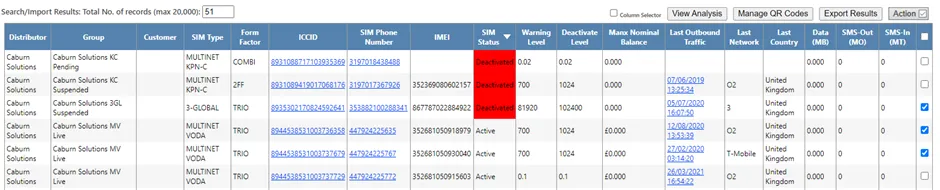
Search results display detailed information for each SIM, including:
- SIM status and warning level
- Last outbound traffic date
- Usage figures for the current month
- Network, country, and RAT information
SIMs that have reached warning thresholds are highlighted in amber. SIMs that have reached cut-off limits are highlighted in red.
You can customise which columns are displayed using the column selector and then re-run the search to update the results.
Results can be sorted by any column by selecting the column header, toggling between ascending and descending order.
Exporting results
Up to 20,000 SIMs can be displayed directly in the results table. For larger result sets, SIM Finder allows exports of up to 250,000 SIMs to a spreadsheet.
Exports include the full result set, not just the SIMs currently visible on screen, enabling further offline analysis.
Links to related actions
Within the results table, blue links provide quick access to related pages, including:
- SIM Focus
- Traffic Details
- Send SMS
- SIM Action
These links allow you to move directly from analysis into investigation or action without re-running searches.
Bulk SIM actions
To perform actions on multiple SIMs:
- Select the required SIMs using the tick box at the end of each row
- Click Action
This opens the SIM Action page with the selected SIMs automatically loaded.
Managing eSIM QR codes
Some SIMs are provided as virtual SIMs using QR codes rather than physical devices. SIM Finder includes tools to view and manage these QR codes.
You can:
- Filter SIMs by QR code status
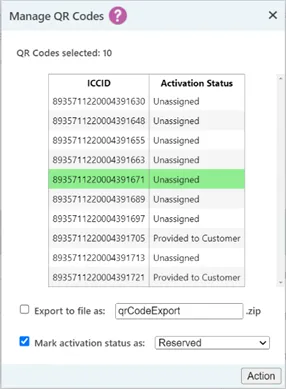
- Select multiple SIMs and choose Manage QR Codes
- View selected SIMs in a dedicated management panel
From this panel, you can update QR code activation status and optionally export QR codes for distribution.
Individual QR code management
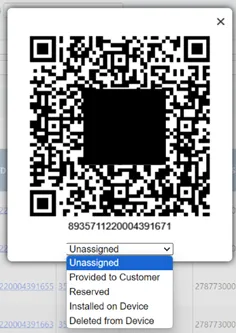
Selecting a single SIM displays its QR code and allows you to update its activation status directly. This helps track the lifecycle of each QR code from assignment through installation and activation.
SIM analysis view
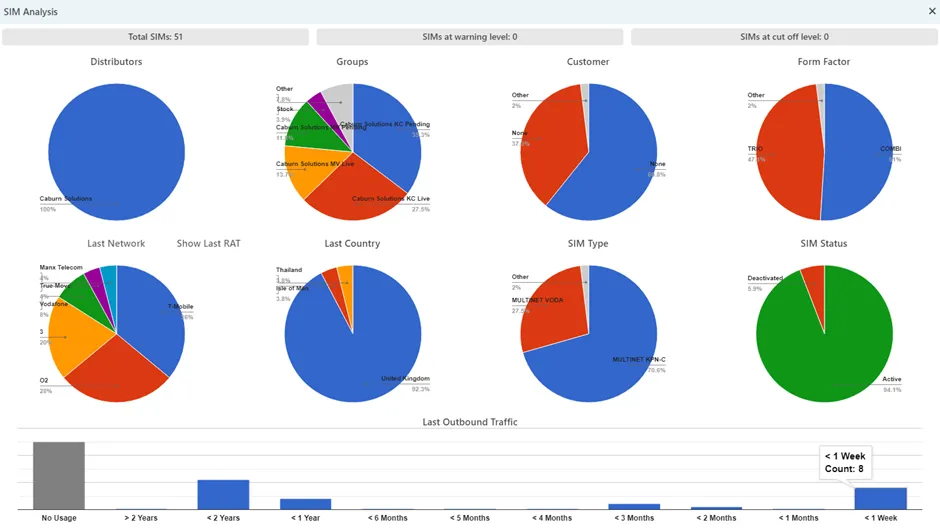
The View Analysis button provides a visual summary of the full result set. This analysis uses all matching SIMs, not just those displayed on screen.
Charts are designed to highlight trends and distributions, helping you identify patterns that may require further investigation.
Radio access technology analysis
Within the analysis view, the Last Network chart can be expanded to show the breakdown of radio access technologies in use.
You can:
- Select Show Last RAT to view the overall RAT breakdown
- Select a specific network to view RAT usage for that network only
The accuracy of RAT information depends on the data provided by the network operator and the SIM implementation. For example, some networks report only high-level RAT categories rather than specific technologies.